Can you use a ps5 controller on a ps4? Here’s What You Need to Know!
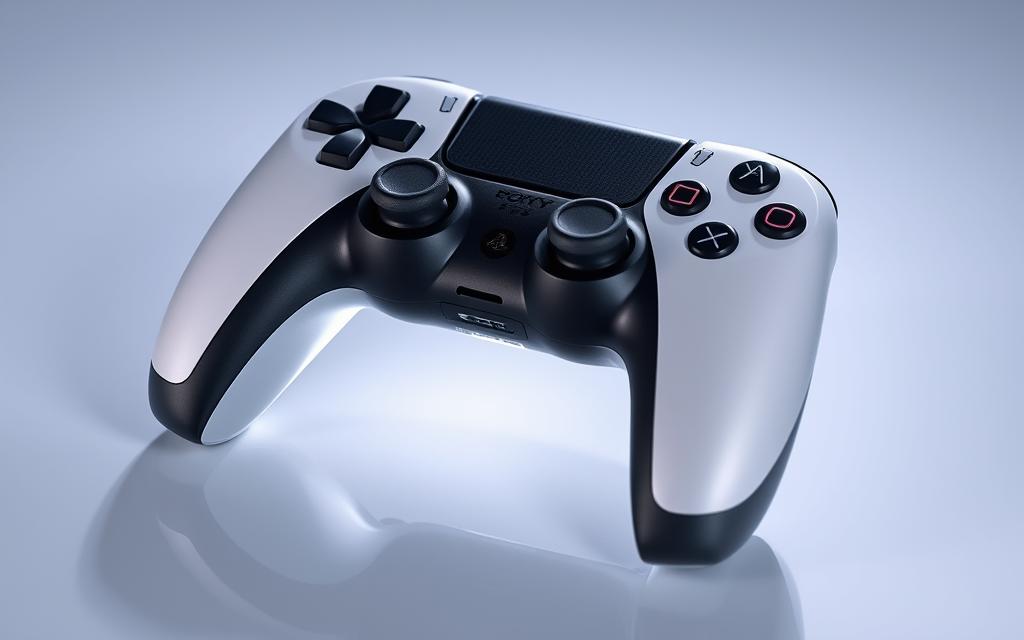
The PS5’s DualSense controller represents a significant upgrade in gaming technology, offering advanced features that enhance the gaming experience. Many PS4 owners are eager to leverage these improvements with their existing console.
According to Sony’s official FAQ page, the DualSense wireless controller is not compatible with the PS4 console. While plugging a PS5 controller into the PS4’s USB port will charge the device, it won’t enable its functionality.
However, several workarounds have been discovered, allowing gamers to bridge this generation gap. This guide will explore the official compatibility status, detail methods for connecting a PS5 controller to a PS4, and discuss the limitations.
We’ll examine the Remote Play method and the Bluetooth adapter approach, providing step-by-step instructions to help you successfully use your DualSense controller with your PS4 games.
Understanding PS5 Controller Compatibility with PS4
Sony’s official stance on using the PS5 controller with the PS4 is clear, but let’s explore the details. The PS5 controller, known as the DualSense controller, offers advanced features that are not supported by the PS4.
Related:




Official Compatibility Status from Sony
Officially, you cannot connect a PS5 controller to a PS4. According to Sony’s official FAQ page, “The DualSense wireless controller is not compatible with the PS4 console.” This statement creates a clear separation between console generations. The key points to consider are:
- The DualSense wireless controller is not designed to be compatible with the PlayStation4 system.
- When connected via USB, the PS4 will only charge the controller but won’t recognize it for gameplay.
- Sony has maintained this incompatibility to focus on next-generation experiences.
Why the DualSense Controller Doesn’t Work Natively
The incompatibility between the PS5 controller and PS4 stems from fundamental differences in how they communicate. The DualSense controller features advanced technology like adaptive triggers and haptic feedback, which the PS4 hardware wasn’t designed to support.
The technical reasons behind this incompatibility include different wireless protocols and input processing methods. Understanding these differences helps explain why alternative connection methods require additional hardware or software solutions.
The controller architecture differences reflect Sony’s focus on creating next-generation experiences. Despite official limitations, the gaming community has discovered workarounds that effectively bypass these restrictions.
Method 1: Using PS Remote Play to Connect Your PS5 Controller to PS4
PS Remote Play offers a convenient way to use your PS5 controller with your PS4 console. This method allows you to control your PS4 using the DualSense controller, enhancing your gaming experience.
What You’ll Need for This Method
To use PS Remote Play, you’ll need a few things. First, you’ll need access to your PS5 or a PC/laptop, as well as your PS4. You’ll also need to download and install the official PS Remote Play application on your secondary device, which is available for Windows, macOS, iOS, and Android platforms.
The DualSense controller will connect directly to your secondary device via Bluetooth or USB cable. Ensure that your PS4 has the Remote Play feature enabled in its system settings before attempting this connection method.
Setting Up PS Remote Play on Your Device
To set up PS Remote Play, start by downloading and installing the application on your secondary device. Once installed, open the app and sign in with your PlayStation Network account.
Follow the on-screen instructions to complete the setup process. You’ll need a stable internet connection for both your PS4 console and your secondary device, with a recommended speed of at least 5 Mbps for basic functionality and 15+ Mbps for optimal performance.
Connecting Your DualSense Controller
To connect your DualSense controller, put it in pairing mode by pressing and holding the PS button and the Create button simultaneously. Your secondary device should detect the controller, allowing you to pair it via Bluetooth.
Alternatively, you can connect the controller using a USB cable. Once connected, you’ll be able to use the DualSense controller to control your PS4 via the Remote Play app.
Step-by-Step Instructions for Remote Play Connection
To establish a Remote Play connection, follow these steps:
- Open the Remote Play app on your secondary device.
- Sign in with your PlayStation Network account.
- Ensure your PS4 is turned on and connected to the internet.
- Use the app to connect to your PS4.
- Once connected, you can use your DualSense controller to play PS4 games.
By following these steps, you can enjoy the improved ergonomics and button responsiveness of the DualSense controller while playing your PS4 game library.
Method 2: Using Bluetooth Adapters to Connect PS5 Controller to PS4
Bluetooth adapters offer a hardware-based solution to connect your PS5 controller to your PS4 console. This method provides a direct connection between the DualSense controller and the PS4, eliminating the need for additional devices or complex setup processes.
Types of Compatible Bluetooth Adapters
Several third-party Bluetooth adapters are designed to enable cross-compatibility between different controllers and consoles. The Mayflash Magic-S Pro and Titan Two are among the most popular and reliable options available. These adapters are specifically designed to translate the signals from your PS5 controller into a format that your PS4 can recognize.
How to Set Up a Bluetooth Adapter
To set up a Bluetooth adapter, start by plugging it into an open USB port on your PS4 console. Once connected, you’ll need to put the adapter into pairing mode by pressing the pairing button. The adapter’s LED lights will begin blinking when it’s in pairing mode, indicating that it’s ready to connect to your DualSense controller.
Pairing Your DualSense Controller with the Adapter
To pair your DualSense controller with the Bluetooth adapter, you’ll need to put the controller into pairing mode as well. Hold the PlayStation button and the Create button simultaneously on your DualSense controller to enter pairing mode. The controller will start flashing blue, indicating that it’s ready to pair. Once both the adapter and the controller are in pairing mode, they will automatically connect to each other, establishing a stable Bluetooth connection.
Using a Bluetooth adapter to connect your PS5 controller to your PS4 offers several advantages, including lower latency compared to Remote Play and the ability to play without an internet connection. While these adapters typically cost between $20-90, they represent a one-time investment that enables permanent compatibility between your PS5 controller and PS4 console.
Can You Use a PS5 Controller on a PS4? Limitations and Considerations
When using a PS5 controller on a PS4, you’ll encounter several limitations that affect your gaming experience. Although the DualSense controller offers improved ergonomics and build quality, some of its advanced features are not compatible with the PS4 console.
Missing Features: Haptic Feedback and Adaptive Triggers
The DualSense controller’s signature features, such as haptic feedback and adaptive triggers, are not supported by PS4 games. These features enhance the gaming experience on the PS5, but PS4 games were not designed to utilize them. As a result, you’ll miss out on these advanced features when playing PS4 games with the DualSense controller.
Performance Considerations with Remote Play
Using the Remote Play method to connect your PS5 controller to PS4 introduces some degree of input latency. This latency may be noticeable in fast-paced or timing-sensitive games. The quality of your network connection significantly impacts your gaming experience, with potential issues including video compression artifacts, frame drops, or input delays.
Latency and Connection Quality Issues
The Bluetooth adapter method generally offers better performance than Remote Play, but may still introduce slight latency compared to using a native DualShock4 controller. Connection quality can significantly impact your gaming experience, especially when using Remote Play.
Battery Life and Charging Considerations
The battery life of the DualSense controller may differ when used with a PS4 compared to its native PS5 environment. You may need to charge the controller more frequently, especially if you’re playing games for extended periods.
In summary, while you can use a PS5 controller on a PS4, there are several limitations to consider. These include missing features like haptic feedback and adaptive triggers, performance considerations with Remote Play, latency and connection quality issues, and battery life and charging considerations. Despite these limitations, the core gaming functionality remains intact, allowing you to enjoy most PS4 games with the improved ergonomics and build quality of the DualSense controller.
- Missing features like haptic feedback and adaptive triggers
- Performance considerations with Remote Play
- Latency and connection quality issues
- Battery life and charging considerations
Conclusion: Is Using a PS5 Controller on PS4 Worth It?
For gamers wondering if they can use their PS5 controller on their PS4, the answer is yes, with some caveats. While Sony doesn’t officially support this configuration, methods like Remote Play and using Bluetooth adapters provide viable workarounds.
The decision to use a PS5 controller with your PS4 depends on your personal preferences and gaming needs. If you value the DualSense’s improved ergonomics and design, these workarounds can enhance your gaming experience.
Ultimately, using a PS5 controller on a PS4 represents the gaming community’s resourcefulness in maximizing hardware versatility across console generations. Weigh the benefits of the DualSense controller against the limitations and extra steps required to make it work with your PS4 system to decide if it’s worth it for you.
FAQ
Is the PS5 DualSense controller compatible with the PS4 console?
The PS5 DualSense controller is not natively compatible with the PS4 console, but there are workarounds to connect it.
How do I connect my PS5 controller to my PS4 using Remote Play?
To connect your PS5 controller to your PS4 using Remote Play, you’ll need to download the PS Remote Play app, set it up on your device, and then connect your DualSense controller to the app.
What are the limitations of using a PS5 controller on a PS4?
When using a PS5 controller on a PS4, you may experience limitations such as missing haptic feedback and adaptive triggers, potential latency issues, and varying connection quality.
Will I be able to use all the features of the PS5 controller on my PS4?
No, some features like haptic feedback and adaptive triggers are exclusive to PS5 games and won’t work on PS4 games, even if you’re using a PS5 controller.
Are there any Bluetooth adapters that can help connect my PS5 controller to my PS4?
Yes, there are compatible Bluetooth adapters available that can help connect your PS5 controller to your PS4, but you’ll need to ensure the adapter is compatible with the DualSense controller.
How does the battery life of the PS5 controller compare when used with a PS4?
The battery life of the PS5 controller should be similar when used with a PS4 via Remote Play or a Bluetooth adapter, but actual battery life may vary depending on the connection method and usage.
Can I play PS4 games on my PS5 controller using Remote Play?
Yes, you can play PS4 games on your device using the PS Remote Play app, and you can use your PS5 controller to play these games.